
TLDR
- AppsFlyer and Adjust both handle mobile attribution accurately, but they diverge sharply on raw data access, fraud tooling depth, and pricing transparency.
- Adjust publishes clearer pricing tiers and gives teams direct access to raw event data without requiring enterprise contracts.
- AppsFlyer’s creative analytics and its Protect360 fraud suite go deeper than Adjust’s offering, which matters for teams running large-scale paid UA across many networks.
- Mid-size gaming teams spending heavily on paid UA tend to favor AppsFlyer for its network integrations and granular creative reporting. Subscription and utility apps lean toward Adjust for data ownership and cost predictability.
- The real differentiator is not accuracy. Both platforms are accurate. It is how each platform handles your data after the attribution event fires.
AppsFlyer is the better fit for mid-size app marketing teams running multi-network paid UA campaigns who need element-level creative analytics and a dedicated fraud prevention layer. Adjust suits teams that prioritize raw data access, transparent pricing, and direct warehouse integration over feature breadth. Both are credible MMPs. The pick turns on whether your team needs AppsFlyer’s reporting depth or Adjust’s data control.
Why Most MMP Comparisons Get This Wrong
Most comparisons of AppsFlyer vs Adjust treat the two platforms as nearly identical products competing on price. That framing misses the real decision. The platforms share the same core function, deterministic and probabilistic install attribution, but they make different architectural bets on what happens after the install fires.
AppsFlyer keeps more of the analytics surface inside its own dashboard. Adjust bets that teams want to pipe clean, raw data into their own warehouse and build on top of it. That distinction shapes every downstream choice: what reports you can run, how quickly your data team can work, and what you will pay when your app scales.
If you have already worked through the broader category and need context on how MMPs fit the wider measurement stack, the best mobile app attribution tools comparison covers the full competitive set including Branch, Singular, Airbridge, and Kochava alongside these two.
How Do AppsFlyer and Adjust Actually Handle Attribution?
Both platforms use a combination of deterministic matching (device ID, IDFV, email hash) and probabilistic matching (IP, user agent, behavioral fingerprinting) to credit installs to the correct campaign. On iOS, both have adapted to SKAdNetwork and Apple’s Privacy Nutrition Labels, implementing their own probabilistic modeling layers to estimate campaign performance without device-level signals.
Where they diverge is at the data layer. AppsFlyer’s attribution data lives primarily in its dashboard and Push API, with raw data export available on higher tiers. Adjust routes all event data through its Datascape reporting environment and makes raw data export a standard part of its offering rather than an upsell. For a data engineering team that wants to query attribution events directly in Snowflake or BigQuery, that distinction is not trivial.
Both platforms integrate with the major ad networks. AppsFlyer publicly claims integrations with over 10,000 partners, a number that gives it a meaningful edge for teams running across a long tail of ad sources including niche DSPs, regional networks, and OEM channels.
What Does Each Platform’s Fraud Prevention Actually Do?
Fraud prevention is where the comparison gets most consequential for mid-size teams with real budget at risk. AppsFlyer offers Protect360, its dedicated fraud protection module. Protect360 operates in real time and blocks install fraud, click flooding, device farms, and SDK spoofing before those fraudulent installs consume budget. It is available as an add-on, which means it costs extra.
Adjust includes its fraud prevention suite, Adjust Fraud Prevention, within its core platform rather than as a separate purchase. The suite covers click injection, SDK spoofing, click flooding, and fake installs. According to Adjust’s product documentation, it uses a distributed ledger model to verify attribution integrity across its network.
The honest read for mid-size teams: Adjust’s included fraud tools cover the common attack vectors without a separate line item. AppsFlyer’s Protect360 goes deeper on post-attribution behavioral analysis, which matters when you are running campaigns at scale with significant install volume from high-fraud regions. Teams that want tooling that operates entirely outside the MMP layer can compare options in the ad fraud prevention platform roundup.
AppsFlyer vs Adjust: Feature Comparison for Mid-Size Teams
| Feature | AppsFlyer | Adjust |
|---|---|---|
| Attribution methods | Deterministic, probabilistic, SKAdNetwork, view-through | Deterministic, probabilistic, SKAdNetwork, view-through |
| Creative analytics | Element-level (headline, visual, CTA separately) | Campaign-level creative reporting |
| Fraud prevention | Protect360 (add-on, additional cost) | Included in core platform |
| Raw data access | Available on higher tiers via Push API or Data Locker | Standard feature across plans |
| Network integrations | 10,000+ claimed partners | Large partner network, fewer claimed integrations |
| Reporting environment | AppsFlyer dashboard, SKAN reporting, Custom Dashboards | Datascape, real-time reporting |
| Data warehouse export | Data Locker (S3, GCS, Azure); higher tiers | Raw data export to warehouse, standard access |
| Pricing transparency | Tiered public pricing, costs rise with events | Public pricing page with plan tiers |
| iOS privacy (ATT) | Privacy Cloud, aggregated modeling | Probabilistic modeling, SKAdNetwork support |
| Cohort and LTV analysis | Deep cohort tools, Audiences module | Cohort analysis, Audiences product |
How Much Does AppsFlyer Cost vs Adjust?
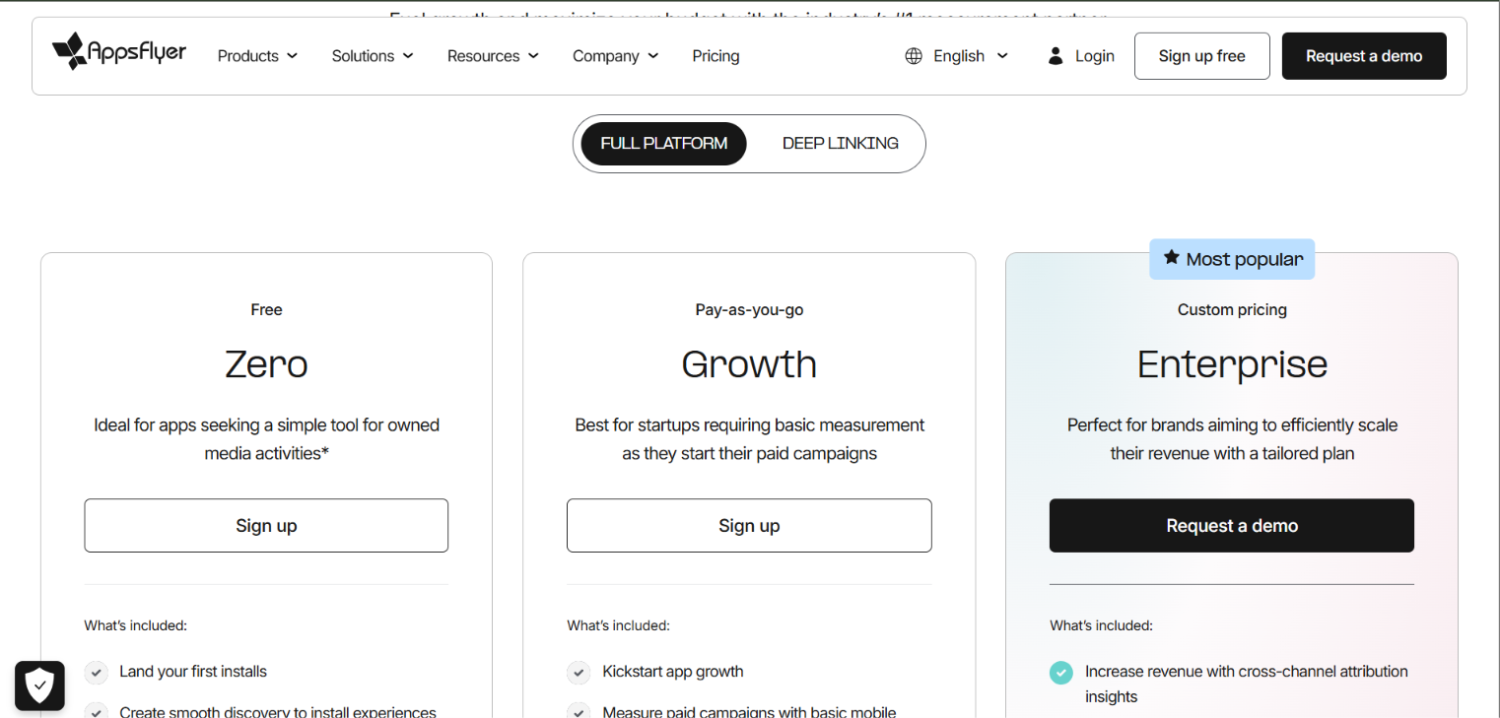
AppsFlyer’s public pricing page shows a free tier for small apps (up to a stated conversion event limit), a Growth plan, and an Enterprise plan. Pricing on paid tiers is event-based, meaning costs scale with the number of attributed events your app generates. AppsFlyer does not publish specific per-event rates publicly, which makes forecasting difficult without a sales conversation. Protect360 is priced separately.
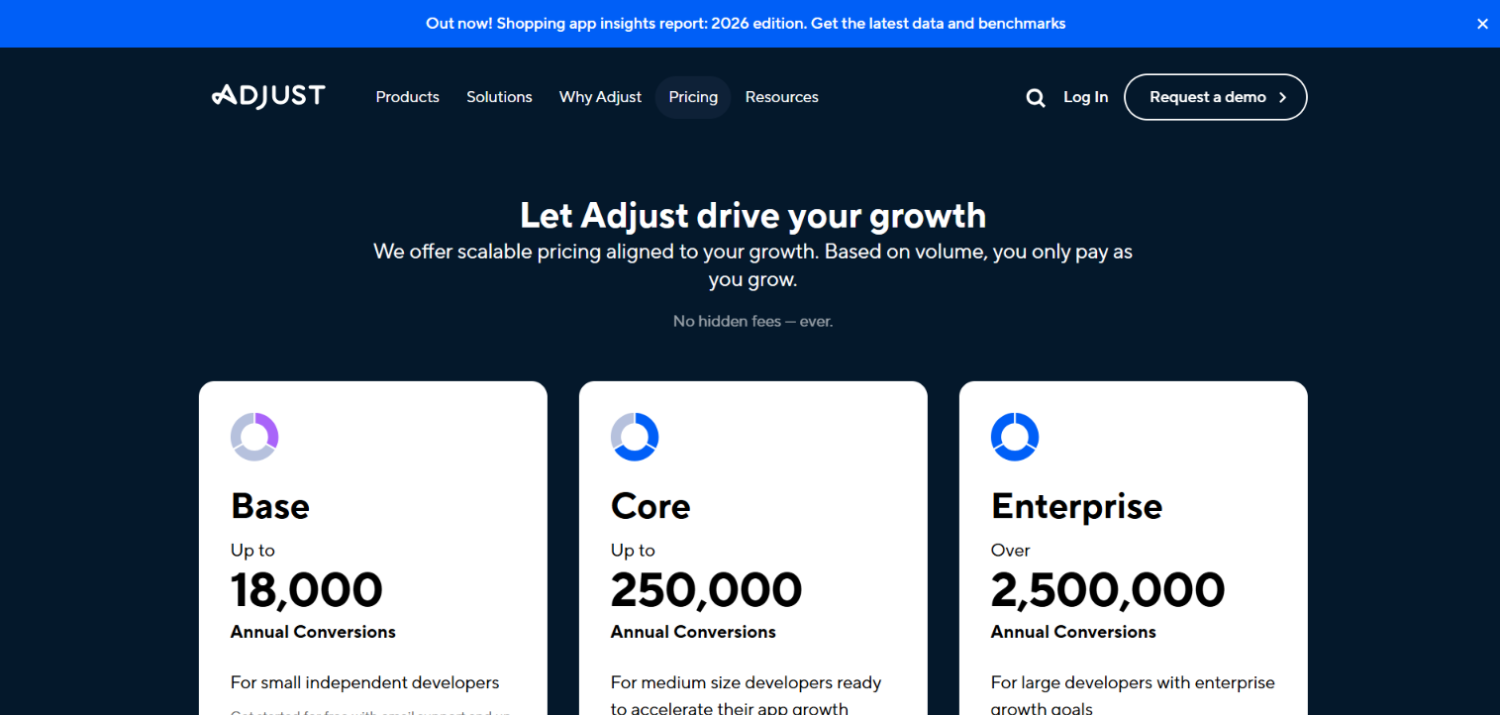
Adjust’s public pricing page lists a Starter plan, a Business plan, and an Enterprise plan. The Business plan is the relevant tier for most mid-size teams and includes the fraud prevention suite, raw data export, and Datascape reporting. Adjust is rated higher for price satisfaction among reviewers according to third-party software review data, consistent with the general market perception that Adjust offers stronger value at mid-market scale.
The hidden cost in both platforms is the gap between what is included and what is add-on. For AppsFlyer, Protect360 and certain advanced audience features carry separate fees. For Adjust, the Business plan covers more ground by default, but very high event volumes will push teams toward Enterprise pricing regardless. Get a written scope of what constitutes a “conversion event” in your contract before signing either.
The AboutMartech MMP Stack-Fit Test
Most teams pick an MMP based on a demo and a reference call. That process misses four checks that predict whether the platform will still fit 18 months from now. The four checks below form what AboutMartech calls the MMP Stack-Fit Test: a repeatable pre-signature framework for evaluating any mobile measurement platform against your actual stack, not the one the vendor assumes you have.
Check 1 , Data egress ownership. Ask the vendor directly: can your engineering team pull every raw attribution event, including reattributions and unattributed installs, to your own data warehouse on your current plan? If the answer involves a tier upgrade, price that upgrade before signing. For teams building a warehouse-first data stack, this check alone can flip the recommendation.
Check 2 , Fraud accountability mechanics. Ask for specifics on what happens when fraud is detected post-install. Does the platform claw back credit? Does it alert you in real time or in next-day reports? Protect360 operates in real time at the install level. Adjust’s suite also operates in real time but does not include the same post-attribution behavioral layer. Know which model fits your exposure.
Check 3 , Network coverage for your specific mix. List your top 10 ad sources by spend. Verify that the MMP has a direct certified integration with each one, not just a generic postback. AppsFlyer’s depth on regional and emerging networks is a real advantage here, not marketing language.
Check 4 , iOS modeling transparency. Both platforms use probabilistic modeling to fill the SKAdNetwork measurement gap, but they use different methodologies and neither publishes its full model. Ask each vendor to show you a real example of how it reports campaign performance when ATT opt-in rates are below 20%. The answer will tell you more than any feature list.
Run all four checks before the contract negotiation begins. The Stack-Fit Test applies equally to Singular, Airbridge, Branch, and any other MMP under evaluation, the questions do not change, only the answers.
Which Platform Wins for Gaming App Teams?
Gaming is the category where AppsFlyer holds the clearest advantage for mid-size teams. The reasoning is specific: gaming UA typically runs across a wide range of ad networks simultaneously, including ironSource, Unity Ads, AppLovin, Vungle, and regional networks in Southeast Asia and Latin America. AppsFlyer’s partner network breadth and its certified integrations with gaming-specific DSPs reduce the number of custom postback configurations your team needs to manage.
Gaming teams also tend to run higher creative volume, testing dozens of video and playable ad variants concurrently. AppsFlyer’s element-level creative analytics, which break performance down by headline, visual, and call-to-action separately, give UA managers faster signal on which creative components drive installs versus which drive high-LTV cohorts. Adjust reports at the campaign and creative-set level, which requires more manual analysis to surface those component-level insights.
Fraud exposure in gaming is also structurally higher than in most other verticals. Install farms and click flooding are common attack vectors in high-volume gaming UA. The argument for paying the Protect360 add-on cost is stronger in gaming than in most other categories.
Which Platform Wins for Subscription and Utility App Teams?
Subscription apps, tools, productivity software, health and fitness platforms, have different measurement priorities. Install volume tends to be lower and more valuable per install. The focus is on LTV attribution, reattribution accuracy, and clean cohort data rather than creative iteration speed.
For these teams, Adjust’s architecture is a better default. Raw data access means the analytics team can build custom LTV models in the warehouse without being constrained by Adjust’s pre-built report formats. Adjust’s Datascape environment handles real-time reporting well, and the included fraud prevention covers the attack vectors that subscription apps realistically face. Paying the AppsFlyer premium for creative analytics depth is harder to justify when you are running three creative variants rather than thirty.
Reattribution is worth specific attention for subscription apps. When a lapsed subscriber reinstalls and resubscribes, accurate reattribution credit determines whether your retargeting spend looks effective. Both platforms handle reattribution, but confirm the lookback windows and the re-engagement attribution logic against your specific use case before committing.
How Does Each Platform Handle iOS Attribution in a Post-ATT World?
The App Tracking Transparency framework reshaped MMP measurement in 2021 and the market has not fully stabilized. Both AppsFlyer and Adjust have built modeling layers to compensate for lost IDFA signals, but their approaches differ.
AppsFlyer’s Privacy Cloud uses aggregated, privacy-safe data to build probabilistic models that estimate campaign performance where deterministic matching is unavailable. It also handles SKAdNetwork data natively and translates SKAN conversion values into readable performance metrics through its SKAN reporting module.
Adjust uses a similar probabilistic fill approach and supports SKAdNetwork conversion value configuration through its dashboard. Both platforms allow marketers to define their own SKAN conversion schemas, though the tooling for doing so is more polished in AppsFlyer’s interface based on published third-party reviews.
The honest assessment: neither platform solves the iOS measurement gap completely. Any MMP claiming otherwise is overstating. Teams running attribution alongside a broader measurement approach, including marketing mix modeling for upper-funnel spend, will get a more accurate total picture. The best marketing mix modeling tools for post-cookie measurement covers that complement to MMP data.
What Do Teams Say About AppsFlyer and Adjust After Using Both?
The practitioner consensus that surfaces in forums and review data tracks closely with the technical differences above. Teams that have run both platforms report that AppsFlyer’s dashboard is more feature-dense but requires more onboarding time. Adjust is faster to implement and the data export workflow is simpler for engineering teams that want to own their pipeline.
A recurring complaint about AppsFlyer at mid-market scale is cost unpredictability as event volume grows. Event-based pricing works in AppsFlyer’s favor when teams are small, but mid-size teams reporting on 20 to 30 million monthly events describe meaningful cost jumps when crossing tier thresholds. Adjust receives similar complaints about Business-to-Enterprise tier transitions, though less frequently in public review data.
Support quality at mid-market scale is a genuine differentiator. AppsFlyer’s partner base and documentation are extensive, which means most implementation questions are answered before they reach a support ticket. Adjust’s support team receives higher marks for responsiveness in reviews, but the documentation depth is narrower.
How Do AppsFlyer and Adjust Compare on Attribution Data and Marketing Analytics?
Attribution data from an MMP is only as useful as what you can do with it downstream. Both platforms connect to dashboards, but the paths diverge at the warehouse layer. Adjust’s approach aligns naturally with teams already running a modern data stack: attribution events flow to S3, BigQuery, or Snowflake, and from there into whatever BI or modeling layer the team uses.
AppsFlyer’s Data Locker covers the same warehouse destinations but is gated on higher plan tiers. Teams on Growth plans rely primarily on AppsFlyer’s internal reporting and the Push API for event streaming. That matters if your marketing operations team expects to blend attribution data with CRM, product analytics, and ad cost data in a single warehouse query. For a broader look at how attribution connects to the full revenue picture, the best marketing attribution tools comparison covers multi-channel approaches beyond MMP data alone.
Product analytics integration is also relevant. AppsFlyer and Adjust both handle mobile event tracking for campaign attribution, but they are not substitutes for a product analytics platform. Teams confusing MMP event coverage with full product analytics often end up with gaps in their funnel visibility between install and first meaningful engagement. For the distinction between what an MMP covers and what a product analytics tool covers, the best product analytics tools comparison is a useful reference.
Frequently Asked Questions: AppsFlyer vs Adjust
Is AppsFlyer or Adjust more accurate for attribution?
Both platforms use deterministic and probabilistic matching and both are considered accurate MMPs by the industry. Accuracy differences between the two are not meaningfully documented in independent testing. The real differences are in what data you can access after attribution fires, how fraud is handled, and how creative performance is reported. Teams choosing between them based on “accuracy” alone are making the decision on the wrong axis.
How much does AppsFlyer cost for a mid-size app team?
According to AppsFlyer’s public pricing page, there is a free tier for lower-volume apps and paid Growth and Enterprise tiers priced per attributed conversion event. AppsFlyer does not publish specific per-event rates publicly. Protect360 fraud protection is an additional cost on top of the base plan. Mid-size teams should request a custom quote and ask specifically what triggers a tier upgrade, because event-based pricing can shift significantly as campaign volume grows.
How much does Adjust cost?
According to Adjust’s public pricing page, Adjust offers a Starter plan, a Business plan, and an Enterprise plan. The Business plan covers fraud prevention, raw data export, and Datascape reporting. Specific pricing for Business and Enterprise tiers is quote-based. Adjust is generally perceived as offering stronger price-to-feature value at mid-market scale than AppsFlyer, based on third-party review data, though both platforms become significantly more expensive at high event volumes.
Which MMP is better for gaming apps?
AppsFlyer holds an advantage for gaming UA teams. The combination of deeper network integration coverage, element-level creative analytics for high-volume creative testing, and Protect360’s real-time fraud blocking addresses the specific pressures of gaming paid UA. Gaming teams running significant spend across ironSource, Unity Ads, AppLovin, and regional networks benefit most from AppsFlyer’s integration breadth. Adjust is a credible alternative for studios that prioritize data ownership over creative reporting depth.
Does Adjust include fraud prevention, or is it an add-on?
Adjust includes its fraud prevention suite within its core platform rather than as a separate purchase. The suite covers click injection, SDK spoofing, click flooding, and fake installs. AppsFlyer’s Protect360, by contrast, is a separate add-on that carries additional cost beyond the base attribution plan. For mid-size teams with constrained budgets, Adjust’s included fraud tools reduce total cost of ownership compared to AppsFlyer plus Protect360.
Can I export raw attribution data from both platforms to my warehouse?
Both platforms support raw data export to cloud storage destinations including S3, Google Cloud Storage, and BigQuery. The key difference is access tier. Adjust makes raw data export a standard feature across its paid plans. AppsFlyer’s Data Locker, which enables warehouse-level raw export, is available on higher-tier plans and may require a separate agreement. Teams building a warehouse-first analytics stack should confirm data export terms and costs in writing before signing with either vendor.
What is the difference between AppsFlyer Protect360 and Adjust’s fraud prevention?
Protect360 operates as a dedicated fraud prevention module with real-time blocking at the install level and post-attribution behavioral analysis to identify fraud that passes initial validation. Adjust’s built-in fraud prevention covers the primary attack vectors, click injection, SDK spoofing, and click flooding, and includes a distributed ledger verification model. Protect360 goes deeper on post-install behavioral signals, which matters most for high-volume campaigns in high-fraud verticals like gaming and utility apps in emerging markets.
Should a mid-size team consider alternatives beyond AppsFlyer and Adjust?
Yes. Singular, Airbridge, Branch, and Kochava all serve mid-size teams with distinct advantages on cost, ROI reporting, or regional network coverage. Singular in particular bundles cost aggregation with attribution in a way that neither AppsFlyer nor Adjust matches natively. The Airbridge vs AppsFlyer comparison and the Singular vs AppsFlyer comparison on AboutMartech cover those specific matchups in detail.
The Bottom Line on AppsFlyer vs Adjust
The belief that AppsFlyer and Adjust are the same product at different prices does not survive contact with the actual platforms. Adjust bets on data transparency: raw event access is standard, fraud prevention is included, and the architecture favors teams that want to own their data pipeline. AppsFlyer bets on analytical depth: more creative analytics granularity, more network integrations, and a more sophisticated fraud module, at the cost of higher total spend and more time in the platform’s own environment.
For a mid-size team running paid UA across multiple networks with a meaningful gaming or entertainment app, the AppsFlyer premium is defensible if your UA manager is pulling element-level creative reports weekly. For a subscription app with a lean marketing team and a data engineer who wants to query attribution events in the warehouse, Adjust’s architecture removes friction without meaningful analytical sacrifice.
The decision reduces to one question: does your team get more value from AppsFlyer’s internal analytical surface, or from Adjust’s openness at the data layer? Run the MMP Stack-Fit Test against both before the sales cycle begins and the contract negotiation becomes the primary filter.